
1.Before the visit
a. Please log in to the Chinese Academy of Sciences Large Research Infrastructures User Service Platform (https://lssf.cas.cn/en/index.jsp). If you do not have an account,please sign up first and then log in. Please check your account information to ensure that your passport number has been filled in.
b. Before visiting,it is essential to communicate with the staff of the experimental station. Make sure that there is one approved experiment reservation or arrangement record on the platform. Experiment personnel can visit SECUF as early as 7 days before the experiment starts.
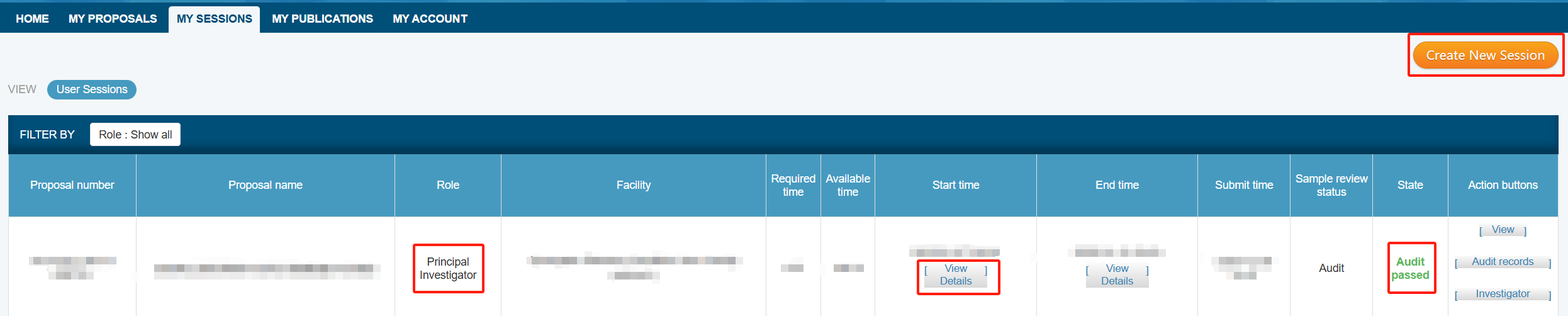
c. Please make sure that visitors are included in the participants of the experiment record. There are two methods below. Please select one or combine them as needed.
(1) Visitors are the Principal Investigator or the Co-Investigator.
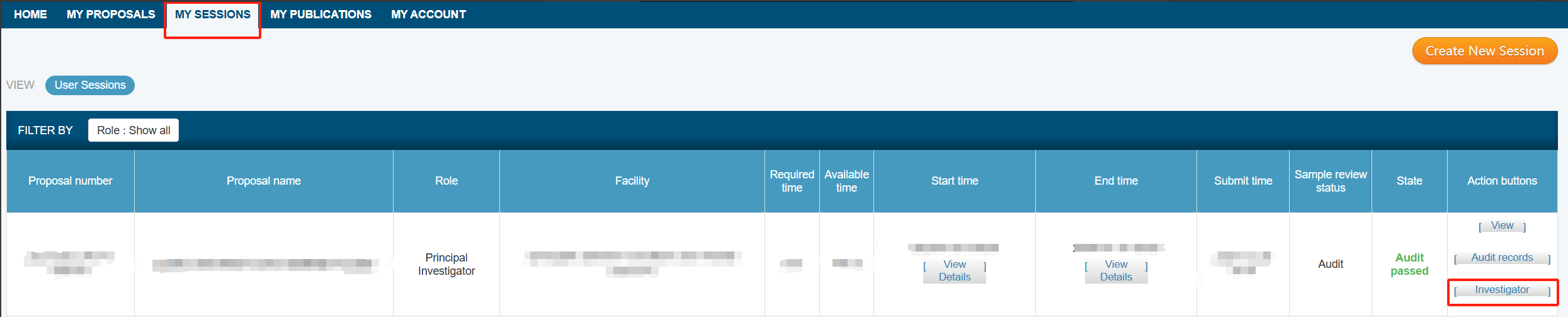
* After logging into the service platform, click on "MY PROPOSALS" to view all the proposals where you are the Principal Investigator or Co-Investigator. The principal investigator can add Co-Investigator to approved proposals at any time. In the "Action Buttons" column, click on "Investigator" to add new Co-Investigator. Co-Investigator can view the basic information and all experimental records of the proposal, and can add visitors to a specific experimental record. By default, the system automatically includes the Principal Investigator and Co-Investigator in the list of experimental visitors for each experimental record of the proposal.

(2) Visitors are present here only for a specific experimental record.
* After logging into the service platform,click on"MY SESSIONS"to view all the experimental records for which you are the Principal Investigator or Co-Investigator. The Principal Investigator or Co-Investigator can add Investigators to the experimental records. In the"Action Buttons"column,click on"Investigator"to add new visitors for a specific experimental record. Investigators can only view the experimental records related to themselves.
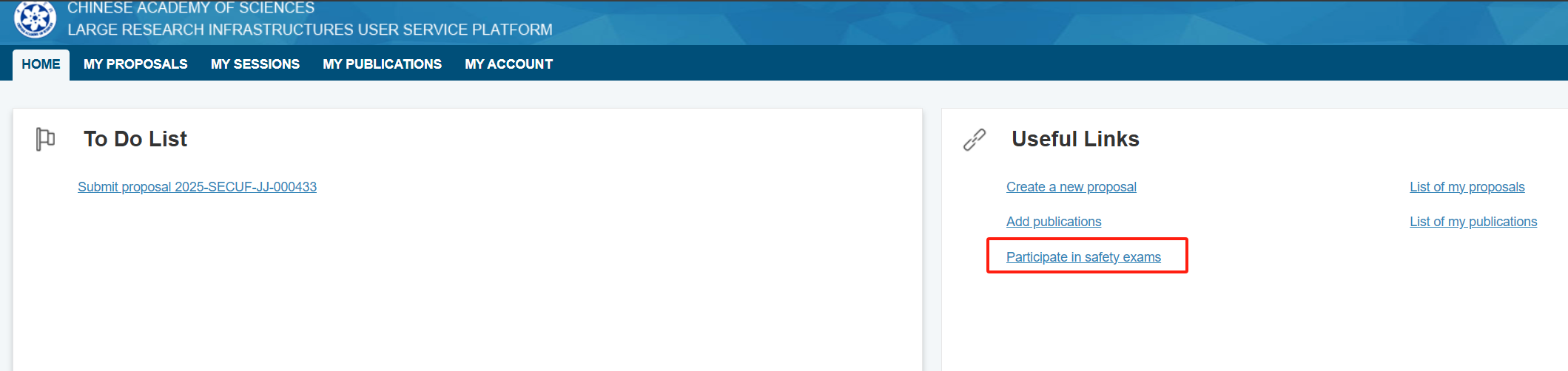
d.Before arriving at the facility,visitors must complete the safety exam for the corresponding experimental station on the service platform. The validity period for the safety exam is one year.
* Please log in to the service platform,click on"Participate in Safety Exam"under the"Useful Links"section,select the name of the corresponding visiting experimental station to take the safety exam,and a full score of 100 points is required to pass.
Please make sure that the above four items have been completed before your visit. If you have any inquiries,please contact the staff of the experimental station. The contact information can be obtained on the website (http://english.secuf.iphy.ac.cn) by clicking on each experimental station under"Stations".
2. During the visit
a. SECUF self-service terminals are placed in the guard booths at the south and north gates of the campus for the collection of user cards. Here are the operating instructions.
b. The interface will show the visitor's experimental record status. Click on"English"in the top right corner to view the English version.
* If it shows “Not found Experiment schedule”,please confirm whether items 1,2,and 3 in"I. Before the Visit"have been completed. If the experiment record can be displayed but the safety review section indicates"Unable to register for the experiment,please check the prompt information in the experiment safety audit section.",please confirm whether item 4 in"I. Before the Visit"has been completed.
c. You can select the corresponding proposal and click"Next."Then confirm the experiment information and click"Next". Click on"English"in the top right corner to view the English version.
d. Please sign the User Safety Responsibility Notice. Click on"English"in the top right corner to view the English version. Each user only needs to sign once during the execution period of a proposal.
e. Please wait and take the user card.
* This user card can be used as an access card and meal card during the experimental period. For meals,please recharge at the convenience store in the X9 building. The user card serves as evidence for enjoying the user agreement price when staying at the X9 building apartments. To avoid the card from wearing and tearing,card sleeves are available on the nearby storage rack. Please help yourself to take one.
f. SECUF has the public office area for users. If you need a temporary office space,you can use your user card to enter:
Building X2:Room 225-227 on the second floor; Building X3: the southern side of the second floor (next to the glass room); Building X7: the glass room in the northwest corner on the first floor.
g. Apartment Accommodation.
If you need to stay in the X9 building's user apartments,please contact the apartment management staff: +86-10-81258706/+86-18801348759.
h. Notes.
If you have any additional questions,you can visit Room 212 on the second floor of the X1 South Building (User Office) for inquiries.
3. After the visit
a. Return the user card.
(Please go to the convenience store on the X9 building to refund any unused meal fees,and then proceed to the self-service terminal to return the card.)
* Please click on"Return"and follow the prompts to insert your user card into the return port,regardless of the direction. The machine will read the information from the returned card. Please click"Next"on the interface. You will receive a prompt if the return is successful. Click on "English" in the top right corner to view the English version.
b. Signature and Acknowledgement.
The signatures of the scientific and technical papers published by the users based on the SECUF or the results of patent application shall be based on the actual contributions of both sides and determined though the friendly consultation between the experimental station and the users in the principle of seeking truth from facts. In addition, the following statement shall be made in the acknowledgement: “This work was supported by the Synergetic Extreme Condition User Facility (SECUF, https://cstr.cn/31123.02.SECUF)”or “(A portion of) this work was carried out at the Synergetic Extreme Condition User Facility (SECUF, https://cstr.cn/31123.02.SECUF) ” .
